
2.8 KiB
Overview
The similar code tool retrieves the most similar code components from inside the organization's codebase, or from open-source code.
For example:
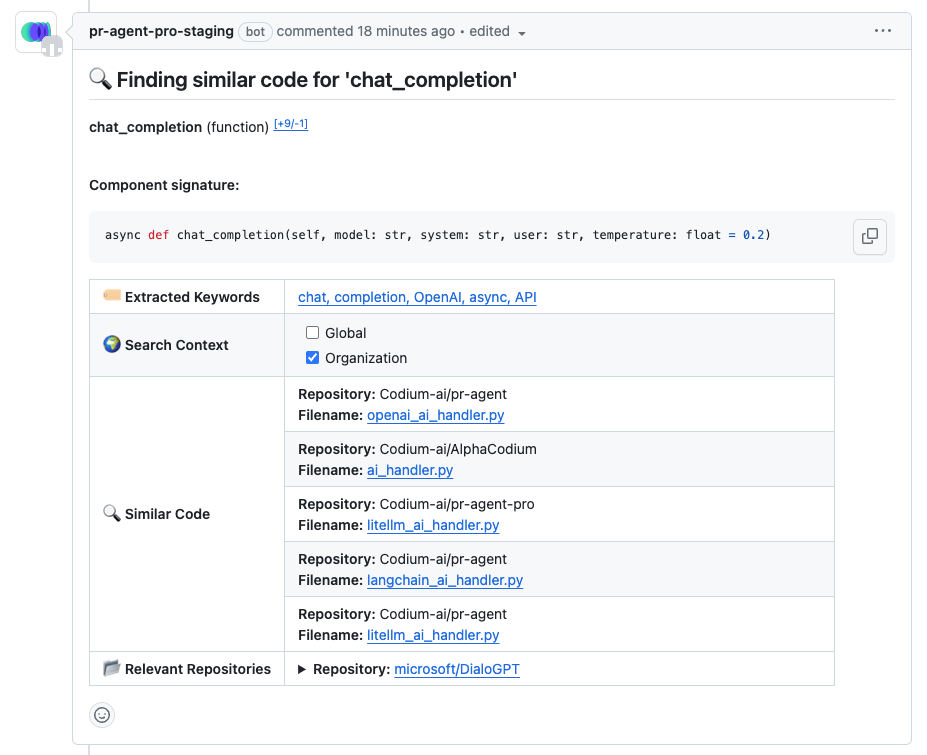
Global Search for a method called chat_completion:
 {width=768}
PR-Agent will examine the code component and will extract the most relevant keywords to search for similar code:
extracted keywords: the keywords that were extracted from the code by PR-Agent. the link will open a search page with the extracted keywords, to allow the user to modify the search if needed.search context: the context in which the search will be performed, organization's codebase or open-source code (Global).similar code: the most similar code components found. the link will open the code component in the relevant file.relevant repositories: the open-source repositories in which that are relevant to the searched code component and it's keywords.
Search result link example:
 {width=768}
Organization Search:
 {width=768}
How to use
Manually
To invoke the similar code tool manually, comment on the PR:
/find_similar_component COMPONENT_NAME
Where COMPONENT_NAME should be the name of a code component in the PR (class, method, function).
If there is a name ambiguity, there are two configurations that will help the tool to find the correct component:
--pr_find_similar_component.file: in case there are several components with the same name, you can specify the relevant file.--pr_find_similar_component.class_name: in case there are several methods with the same name in the same file, you can specify the relevant class name.
example:
/find_similar_component COMPONENT_NAME --pr_find_similar_component.file=FILE_NAME
Automatically (via Analyze table)
It can be invoked automatically from the analyze table, can be accessed by:
/analyze
Choose the components you want to find similar code for, and click on the similar checkbox.
 {width=768}
If you are looking to search for similar code in the organization's codebase, you can click on the Organization checkbox, and it will invoke a new search command just for the organization's codebase.
 {width=768}
Configuration options
search_from_org: if set to true, the tool will search for similar code in the organization's codebase. Default is false.number_of_keywords: number of keywords to use for the search. Default is 5.number_of_results: the maximum number of results to present. Default is 5.